
Lead capture
Turn a QR code into a customer list. Every sign-up in one inbox.
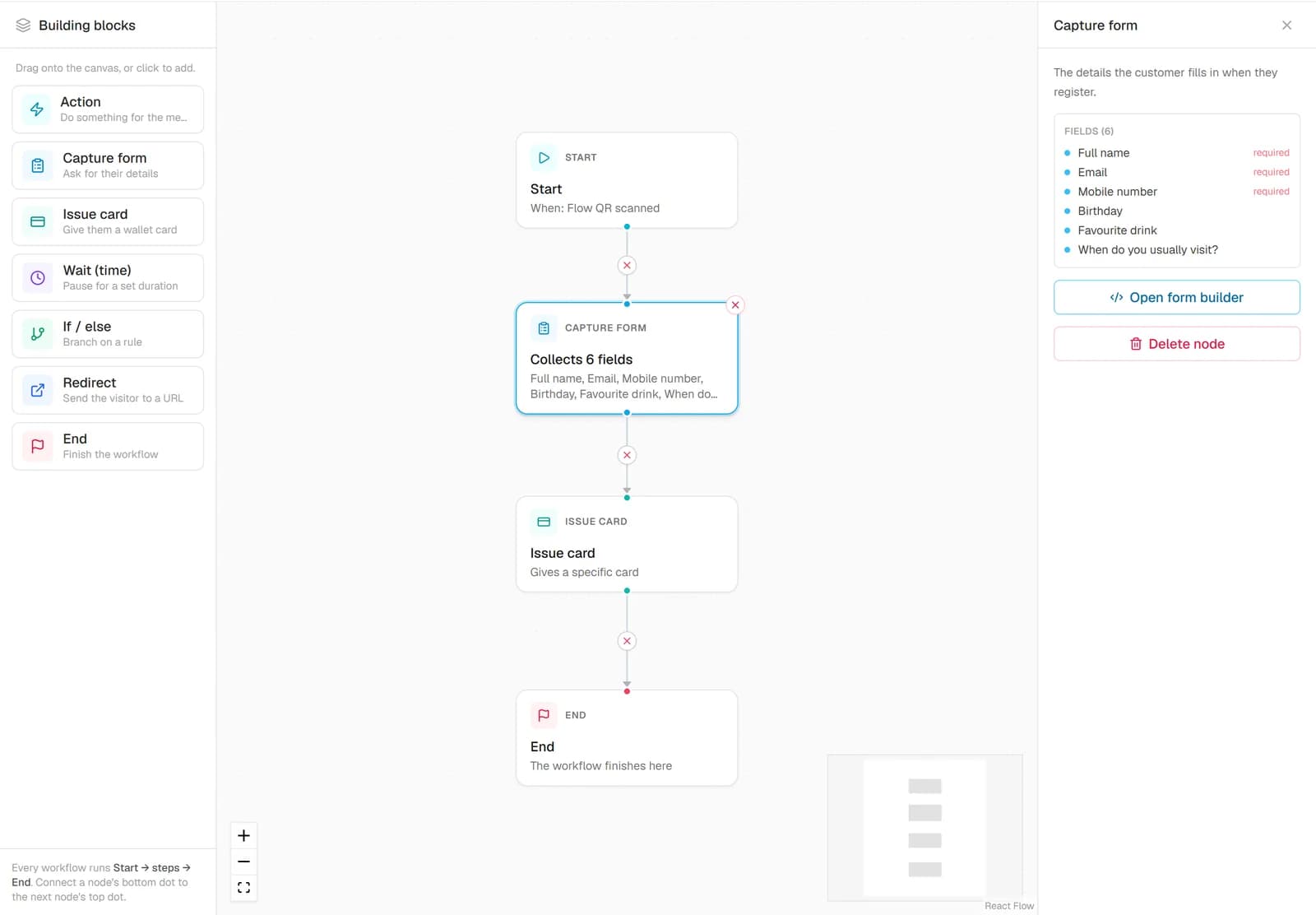
Build a sign-up or enquiry form, share it as a link or a QR code, and choose what each submission does: save a lead, create a member with a wallet card, or both. Then follow up from the lead inbox.
- No credit card needed
- Cancel anytime
- Apple & Google Wallet
Do customers need an app? No. The card lives in Apple Wallet or Google Wallet, already on their phone.
- field types, including file upload
- 8
- outcomes per submit: lead, member with a card, or both
- 3
- lead statuses, from New to Won or Lost
- 5
- lead per person, per form, per day: no duplicates
- 1
Why it matters
Sign-up sheets don't follow up. And nobody types them in.
Names on paper, enquiries lost in messages, and a guest who leaves with nothing to bring them back. The interest was there. The follow-up wasn't.
- Today: Paper sign-up sheets nobody types in.With Loyal Aura: A form on their phone, saved the moment they tap submit.
- Today: Enquiries scattered across messages, email and notes.With Loyal Aura: One lead inbox with search, filters and a status for each lead.
- Today: A new customer leaves with nothing in their pocket.With Loyal Aura: The same form can issue their wallet card straight away.
- Today: Duplicates every time someone submits twice.With Loyal Aura: One lead per person per form per day; a second submit updates it.
Form builder
Ask exactly what you need. Nothing more.
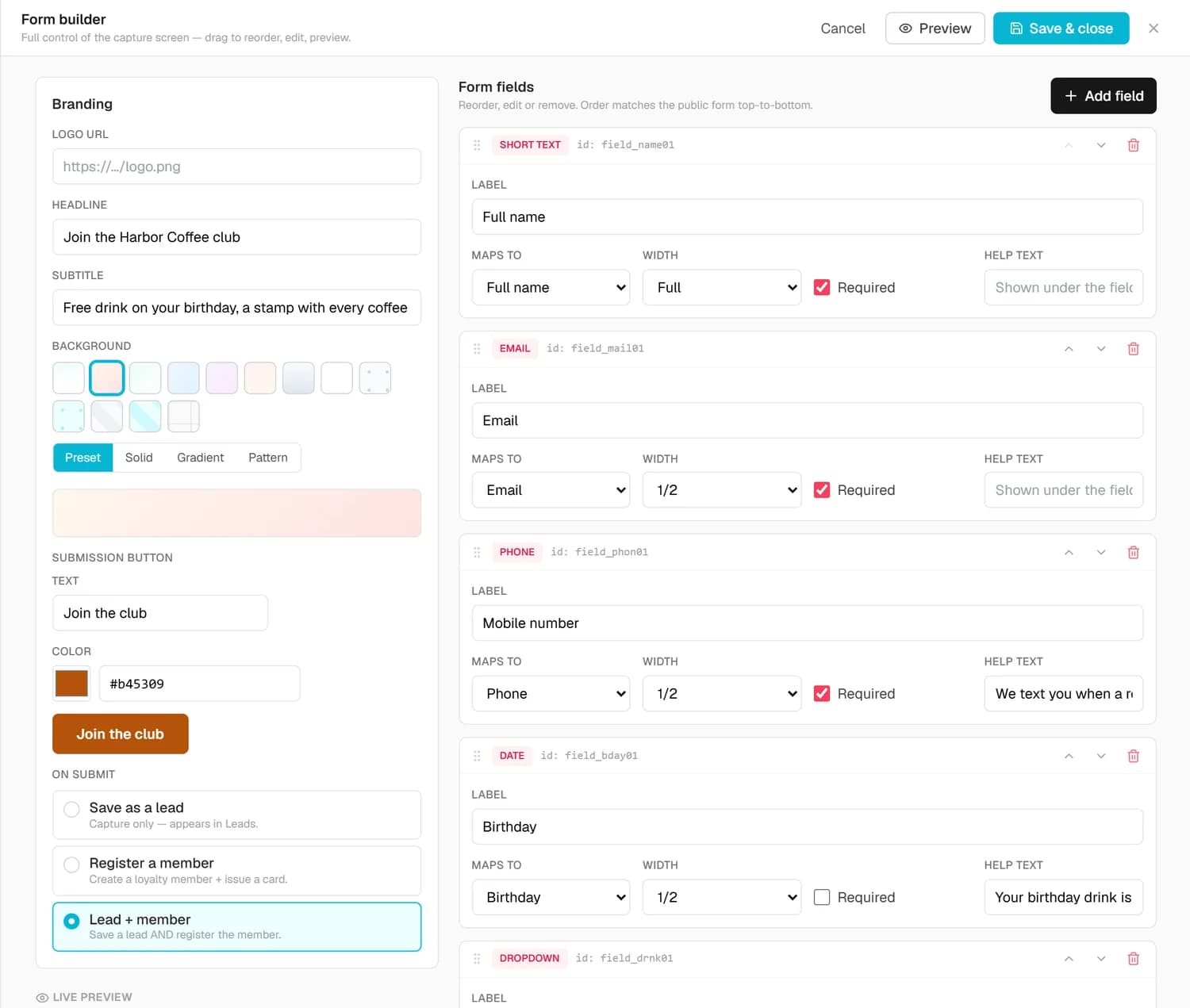
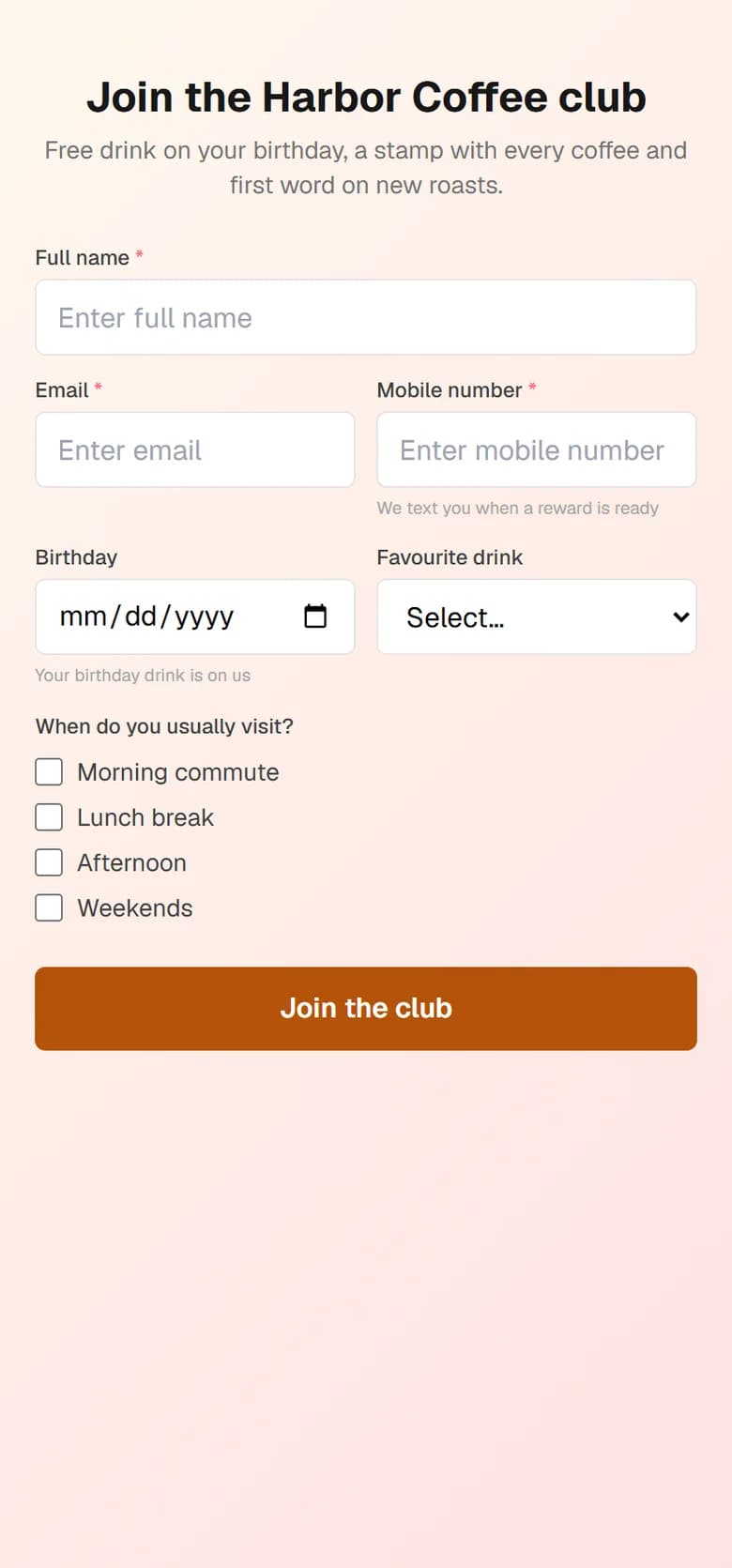
Add short and long text, email, phone, date, checkboxes, a dropdown or a file upload. Mark fields as required, set their width, and map them to name, email, phone or birthday so the answers fill the customer profile. Add your logo, headline, background and button colour.
- Eight field types, including photo and file upload
- Map fields to the customer profile, or keep them as custom answers
- Required fields are checked again on our server, not only in the browser
On submit
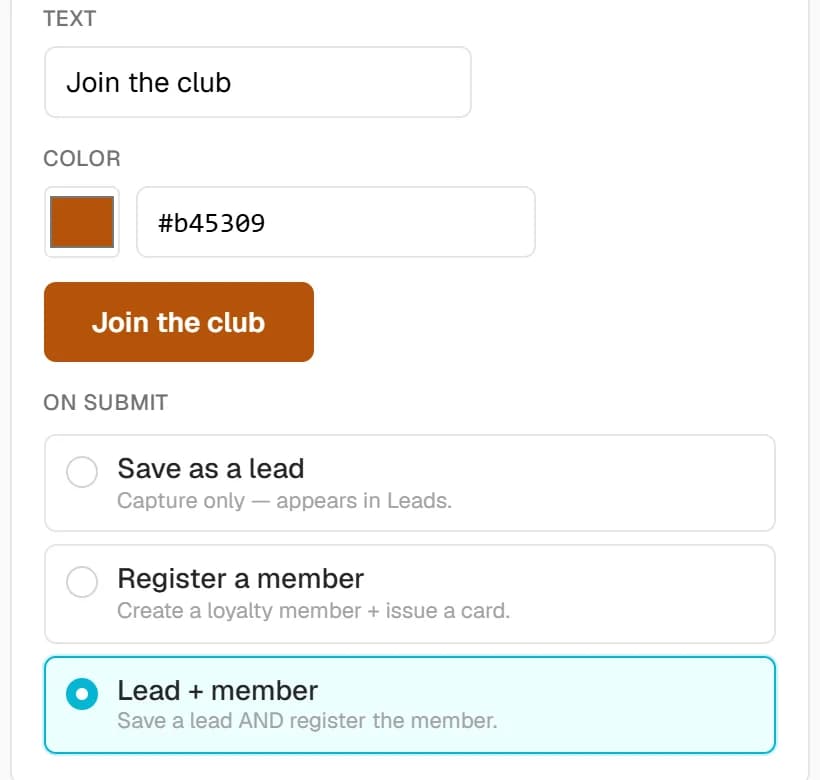
One form, three outcomes. You choose which.
Save the submission as a lead, create a member and issue their wallet card, or do both. A returning customer is matched by phone or email, so they don't get a second card. Every submission fires the Form submitted trigger, so an automation can follow up.
- Lead only, member with a card, or both
- Returning customers matched by phone or email
- Share by link or with a printable Flow QR code
Lead inbox
Every lead, followed up. Until it's won.
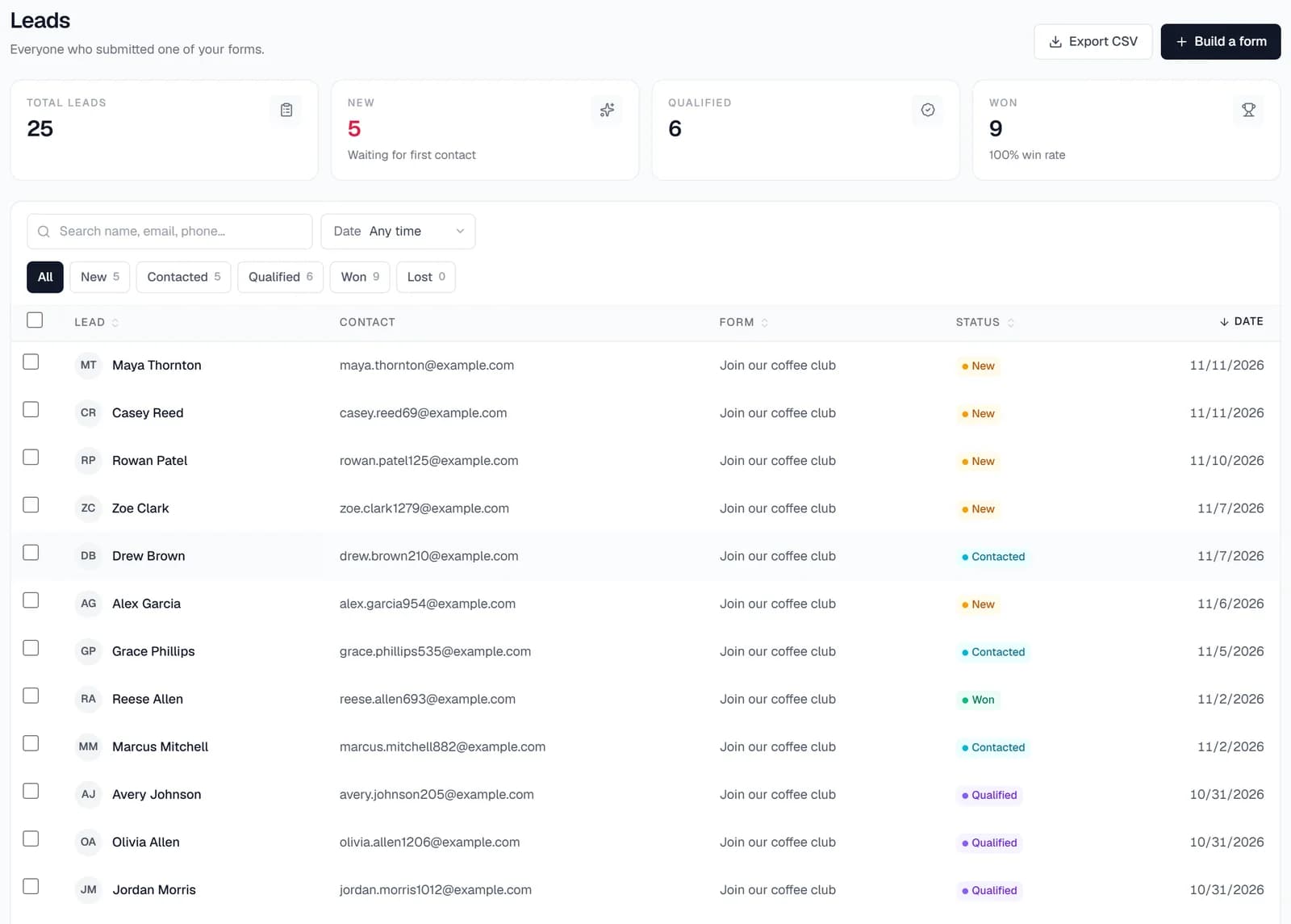
Each submission lands in the lead inbox with all its answers and files. Move it from New to Contacted, Qualified, Won or Lost, add an internal note, and find any lead by name, email or phone.
- Filter by status, form and date
- Change the status of many leads at once, or delete them
- Export the filtered or selected leads to CSV
Join page
Every card has its own sign-up. On every loyalty plan.
Each loyalty card comes with a join page and QR code. Choose whether name, email, phone and birthday are required, show your privacy policy and terms, and print a separate join QR code for each location so you know where members signed up.
- A join link and QR code for every card
- A join QR code for each location
- Referral codes carried in the join link when referrals are on
Where it works
Capture the interest. While it's there.
- Reviews for home-service prosQuote requests with photos of the job, straight to the inbox.
- Salon loyalty programA new-client form that also puts them on your card.
- Gym loyalty programTrial-class sign-ups you can follow up the same day.
- Restaurant loyalty programEvent and catering enquiries in one place.
- Car wash loyalty programMembership enquiries from a QR code at the pay station.
- Coffee shop loyalty appA QR code at the counter that turns guests into members.
Plans and prices
Join pages on every plan. Capture forms from Growth.
Loyalty Starter
$15/ month
- A join page and QR code for your card
- Choose which sign-up fields are required
Loyalty Growth
Recommended$39/ month
- Capture forms with eight field types
- Lead inbox with statuses, notes and CSV export
- The Form submitted trigger for automations
Loyalty Scale
$89/ month
- Everything in Growth
- Unlimited automated triggers
- Email and SMS campaigns to follow up
Prices in USD from our live catalogue, billed monthly or yearly. Every plan starts with a free 7-day trial, no credit card needed.
Start free 7-day trialQuestions
Lead capture, answered.
Still deciding? Book a demo or talk to us, and we will walk you through it.
What is the difference between a join page and a capture form?
Can customers upload photos or files?
What happens if someone submits twice?
How do I share a form?
Can I export my leads?
Which plan do I need?
Do my customers need an app?
Turn a QR code into a customer list. Starting today.
Start a free 7-day trial, put your join QR code on the counter and watch the first sign-ups arrive.
- No credit card needed
- Cancel anytime
- Apple & Google Wallet
Loyal Aura LLC, St. Petersburg, Florida